In this short blog post, we will implement a simple toast component. So, last week I was looking around Twitter and I encountered the Website. The toast interaction was quite cool, so I wanted to implement it with basic JavaScript. The end product is not the same as the one above, but I think it’s quite good.
See the Pen Interactive toast by amatelic (@amatelic) on CodePen.
Quite nice don’t you think?
And the funny part is, that it isn’t even that difficult to implement. With some little magic of css variable and Javascript it’s quite simple.
Toast implementation
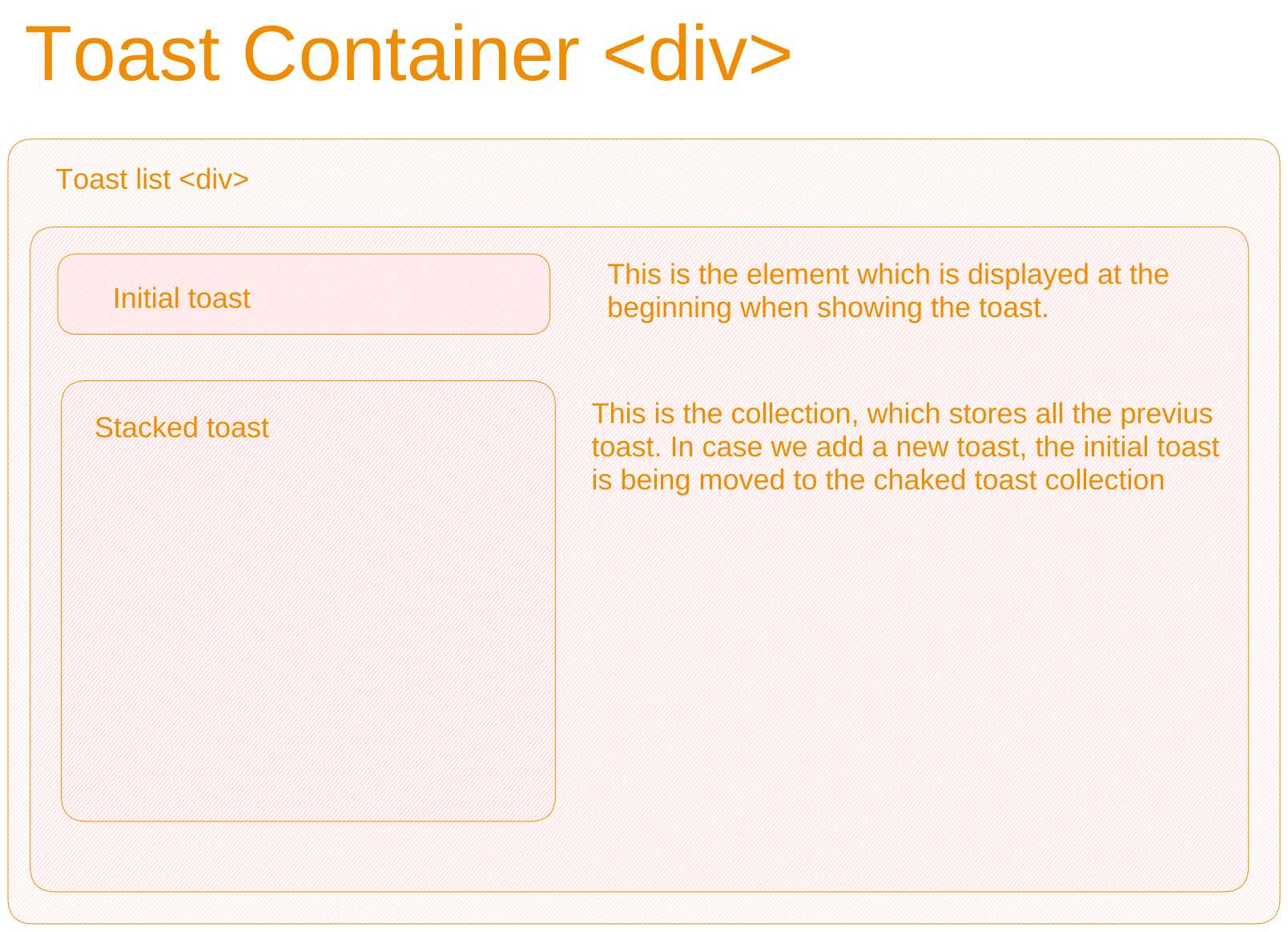
The basic html is quite simple we have one div container for positioning the toast container and one div for showing all the toast.
In the div with all the toast we have two placeholders. One is the initial toast and the other are the stacked toasts.
In simple terms the initial toast is used for animating the first toast interaction and only that while the second stacked toast is used for setting up the interaction of all the remaining toast which are pushed to the background.
So now that we know the basic structure of our html, let’s start adding some interaction
Initial toast logic
Because the initial toast is the first one to be displayed we will start with this one.
The logic for this one is quite simple. When we click the button we just add a class to the element which is used for animating the toast. In this case we use setTimeout to add the end class for finishing the animation
important look at the
tmpElement, this value will be handy in the next section where we implement thetoast stack.
const toastList = document.querySelector(".toast-list");
const tmpElement
const toastElement = createToast(maxCountNumber + 1, count)
toastElement.classList.add('starting-toast')
toastList.append(toastElement)
tmpElement = toastElement

setTimeout(() => {
    toastElement.classList.add('ending-toast')
}, 20
const createToast = (index, count = 0) => {
  const toastElement = document.createElement("div");

  toastElement.innerHTML = `
              <div class="container">
                <p>This is a toast ${count}<p>
              </div>
            `;

  // How to correctly update z index on popup
  // How to animate
  toastElement.style.setProperty("--el-index", index);
  toastElement.classList.add("toast-item");
  return toastElement;
};
Ok, now that our initial toast is working let’s start work on our stack version.
How should we move our initial toast to the stack?
The answer is quite easy. Do you remember tmpElement from before.
Because we have the reference of the previous toast we can just move it
to our toastElements array. This array is used for animating the background toasts.
The code for this is quite simple. Mostly what we are doing is remove old classes from the initial toast and remove clear old toast which want over our threshold
const toastElements = [];
const maxCountNumber = 4;

// after user click second time we store the tmp into
// the toast elements
if (tmpElement) {
  // remove previous
  tmpElement.classList.remove("starting-toast");
  tmpElement.classList.remove("ending-toast");
  toastElements.push(tmpElement);
}

// check if we have to remove any item

if (toastElements.length > maxCountNumber) {
  const element = toastElements.shift();
  element.remove();
}
So now that we have our toast saved to the stack let’s start the interesting part. As you could see form the video. When we add a new toast to the stack we are animating the interaction.
How do we synchronize all the toast to execute at the same time?
The answer to this question is quite simple. With the help of css-properties. Every stack toast has a new style property value added to them which is the index of the selected toast with that value we can set the correct opacity and z,y position.
for (let i = 0; i <= toastElements.length - 1; i++) {
  toastElements[i].style.setProperty("--el-index", toastElements.length - i);
  toastElements[i].style.setProperty("--z-index", i + 1);
}
As you can see we are setting the --el-index and --z-index on each stacked toast.
All the values are being incremented, this is the trick with which we can tell our css classes how to animate the toast.
Below you can se the basic math used for positioning the element, and scaling down the toast. It should be self explanatory.
.toast-item {
  transform: translateX(calc(10px * var(--el-index))) translateY(
      calc((15px * var(--el-index)) * -1 - 5px)
    )
    scale(calc(1 - var(--el-index) * 0.1)); // Example output scale(1 - (2 * 0.1))
}
Quite simple logic don’t you think? Below you can see the whole css class. It include the custom properties values and all the css styling
.toast-item {
  --el-index: 0;
  --el-height: 50px;
  position: absolute;
  top: 0px;
  left: 0px;
  right: 0px;
  bottom: 0px;
  transform-origin: center;
  z-index: calc(var(--z-index));
  transition: all 0.2s ease;
  opacity: calc(1 - var(--el-index) * 0.2);
  transform: translateX(calc(10px * var(--el-index))) translateY(
      calc((15px * var(--el-index)) * -1 - 5px)
    )
    scale(calc(1 - var(--el-index) * 0.1));
}
And that’s it! With this component, you can easily create a toast interaction like the one we saw in the codepen. If you have some cool ideas on how to improve stuff or what to try next, just ping me on twitter 😎.